A style is a complete sound for your voice: tuning, EQ, compression, backing voices, echo, reverb and the motion that changes over the course of the take, all set up together. In Simple mode you choose the style in a carousel and fine-tune it with a few clearly named controls. This page covers the 22 styles, what each control does and how the Premium styles work.
The Simple screen
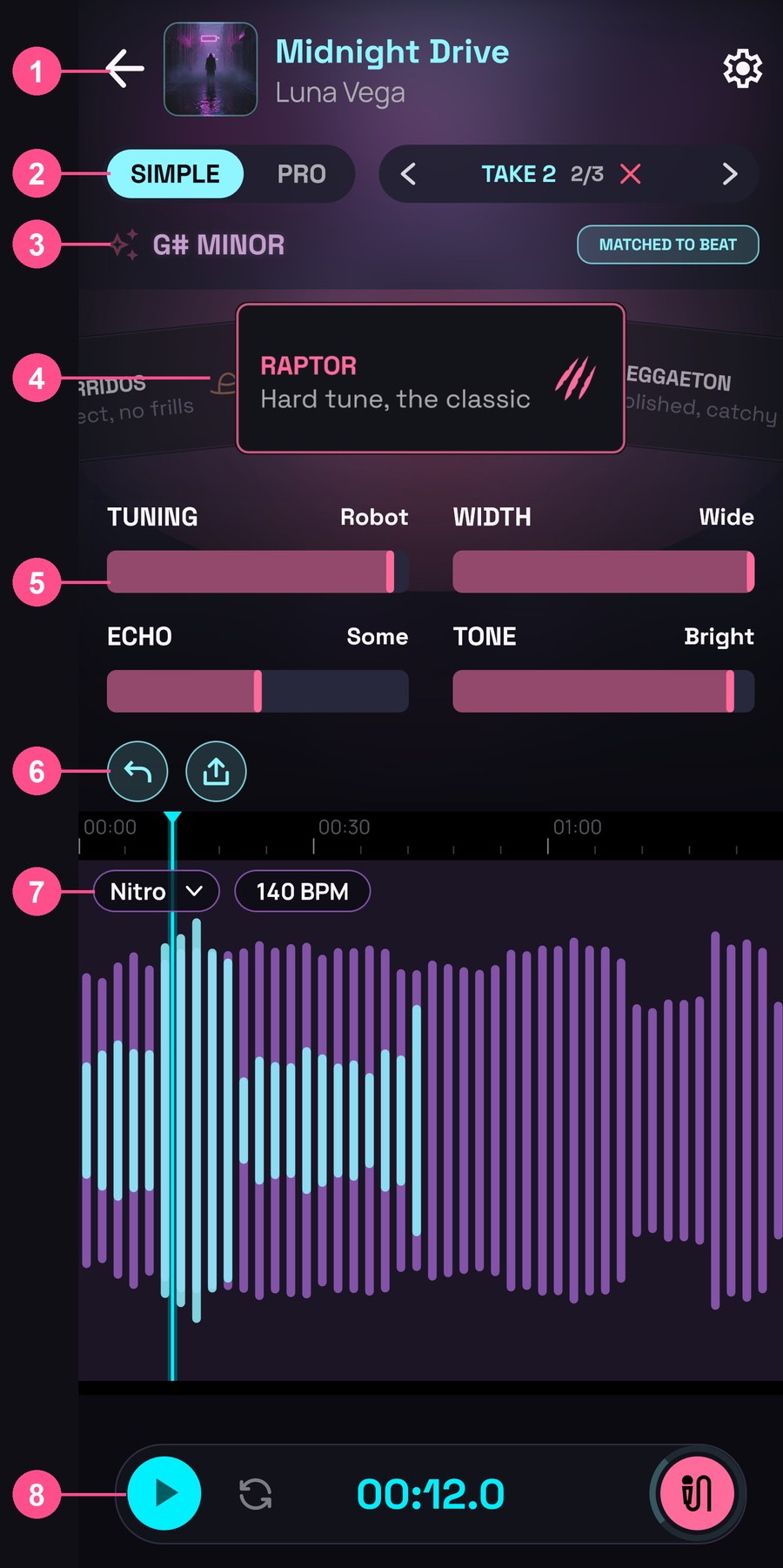
- At the top: back to the Library, the song’s cover and name, and Settings (the gear).
- The Simple | Pro switch and, on the right, the take stepper (for example TAKE 2).
- The key your voice is tuned to and where it comes from (MATCHED TO BEAT, FROM YOUR VOICE or SET BY HAND). It’s covered in Beats and key.
- The style carousel.
- The style’s controls, two by two.
- Undo and share.
- Your song’s waveform, with the beat chip (to change it) and its tempo above it.
- Play, loop, the time and the record button.
The style carousel
- Swipe sideways to move from style to style. The cards turn one by one and the one that ends up in the centre is applied immediately: you hear it straight away. A quick swipe moves one or two cards.
- Tap a card at the side to bring it to the centre.
- The carousel never ends: after the last style, the first ones come round again.
- Each style has its own colour: the centre card lights up with it, and so do the controls.
Which take it applies to
Each take has its own style. What you choose in the carousel and the controls goes to the take you’re on, the one the take stepper shows at the top right:
- Right after recording you’re on the new take: what you choose is for it.
- To change another take, go to it with the stepper’s arrows or by tapping the waveform, and choose.
- Where there’s no take (NO TAKE), what you choose is for the next take you record.
- The next take starts with the last style you chose, on any take. If you record over a take, the new one starts with that take’s style.
- If you change style while the song is playing, it goes to the take that was playing when you put your finger on the cards.
The style doesn’t change the key: your voice is still tuned to the same note and scale.
Made a mistake? Undo also undoes style and control changes.
The 22 styles
The free ones come first, then the Premium ones (with a padlock). After all of them come your own saved styles (see below).
| Style | On the card | How it sounds | |
|---|---|---|---|
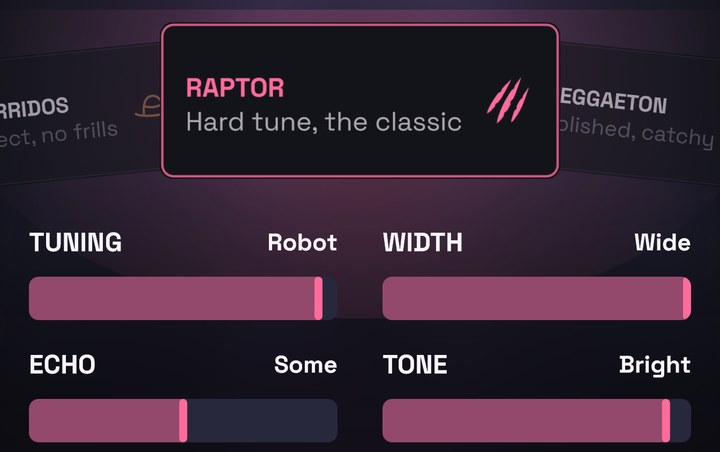
| RAPTOR | Hard tune, the classic | Hard tune, echo throws | Free |
| REGGAETON | Polished, catchy | Glossy and wide, octave on the hook | Free |
| BALLAD | Clean, natural | Clean voice, phrase ends bloom | Free |
| RAP | Punchy, no tuning | Dry and punchy, no tuning, doubled line ends | Free |
| CHOIR | Your voice in chords | Your voice as a tuned chord, wide and lush | Free |
| AMBIENT TRAP | Washed, floating | Reverse swells, a room that grows | Free |
| ROBOT | Vocoder, always in tune | A synth played by your voice, always in tune | Free |
| LOCO | Wild, tap again | Never sounds the same: tap it again | Free |
| MELODIC TRAP | Melodic, wide | Firm tune, ping-pong echoes, ad-libs | Premium |
| DEMON | Deep, demonic | Demon throat, a dark octave below | Premium |
| R&B | Smooth, silky | Silky glide, harmonies and falsetto | Premium |
| LATIN TRAP | Icy, drenched in echoes | Hardest tune, echoes on every phrase | Premium |
| RADIO | Old radio | Mono radio dropping into a wide voice | Premium |
| DEMBOW | Raw, from the street | Barely tuned, shouted, a crowd on the last word | Premium |
| POP | Fresh, sparkling | Clean tune, airy, an octave that sparkles | Premium |
| AFRO | Bright, sunny | Bright and wide, bouncing echoes, harmonies | Premium |
| FLAMENCO | Soulful, warm | Natural melismas, coros on the end | Premium |
| DRILL | Raw, menacing | Dry, deep and slammed, barely tuned | Premium |
| TALKBOX | Robot funk | Robot funk through a tube | Premium |
| MELODIC URBAN | Intimate, two voices | Soft firm tune, close, in two voices | Premium |
| VAPORWAVE | Slowed tape | Slowed, wobbling tape that stops | Premium |
| CORRIDOS | Direct, no frills | Dry and direct, an echo on the last word | Premium |
“On the card” is what the carousel card says; “How it sounds” is the description you see in the style list in Pro mode.
Many styles move: they don’t sound the same from start to finish. An echo that kicks in on the last word of each line, an octave that comes in on long notes, backing voices that answer… That motion is placed on the beat’s timing and on the spots where you sing.
LOCO: different every time
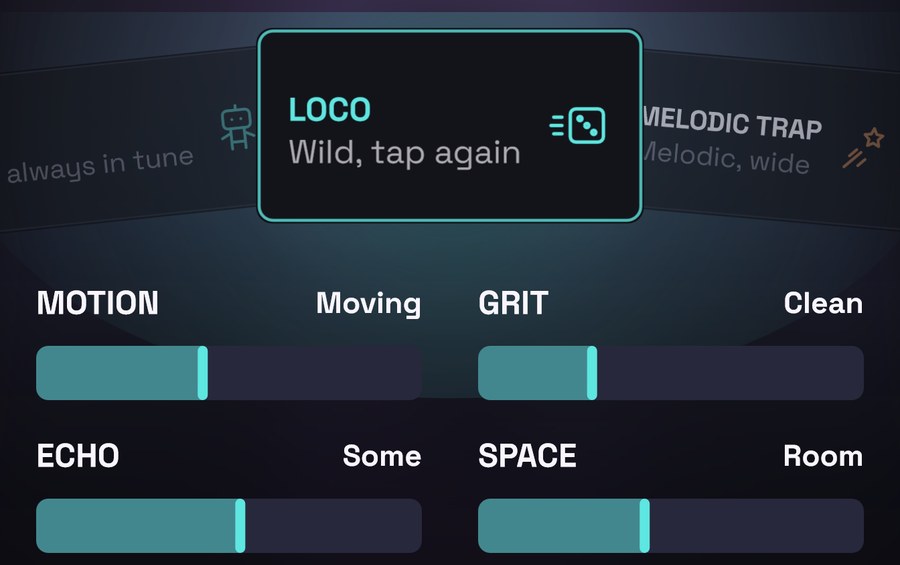
LOCO mixes tricks at random: tape that starts and stops, a voice coming up from under water, jumps to a chipmunk or demon voice, a shredded voice… Each time you choose it you get a new combination. If it’s already in the centre, tap its card again for another roll; each roll also sets its four controls to different positions. The combination is saved with the take: it doesn’t change when you open the song again.
The controls
Below the carousel, each style has up to four controls. Drag them sideways. Instead of a number, each control says where it is: one end, the middle or the other end.
| Control | Ends | In the middle | What it moves |
|---|---|---|---|
| Tuning | Natural → Robot | Tight | How fast and how strictly the tuner pulls your notes onto the scale, and how much vibrato it leaves. At Robot, each note jumps to the next, like a classic hard tune. |
| Space | Dry → Huge | Room | The reverb: how much and how big the room is. |
| Echo | Off → Long | Some | The echo: how much you hear and how many times it repeats. |
| Choir | Solo → Crowd | Group | The voices singing with you: the choir and the harmonies. |
| Octave | Off → Loud | Under | Your voice an octave above or below your own. |
| Tone | Dark → Bright | Balanced | The air, the top end of the voice. |
| Grit | Clean → Dirty | Warm | Saturation, distortion and throat growl. |
| Voice | Deep → Thin | Natural | The timbre of the voice (the formants), without changing the note: bigger and darker or smaller and thinner. |
| Width | Narrow → Wide | Open | The doubled voices at the sides: from one voice in the centre to a voice that fills the stereo. |
| Motion | Still → Wild | Moving | How much the style moves: from a fixed sound to changes more marked than the style’s own. |
A few things worth knowing:
- Each style starts its controls at its own point, which isn’t always the middle: it’s exactly how that style sounds. For example, in RAPTOR Tuning already starts close to Robot.
- The ends sound the same in every style. Tuning at the maximum is just as robotic in RAPTOR as in BALLAD.
- A control moves everything it needs to at once: Space, for example, changes both the amount of reverb and the size of the room.
- The controls also move the style’s motion: if you turn up Echo, the echo throws at the end of lines go up with it.
- The controls belong to the take, like the style. When you change style, its controls go back to their starting point.
Each style’s controls
| Style | Controls |
|---|---|
| RAPTOR | Tuning · Width · Echo · Tone |
| REGGAETON | Tuning · Octave · Grit · Echo |
| BALLAD | Tuning · Space · Echo · Tone |
| RAP | Tuning · Grit · Voice · Space |
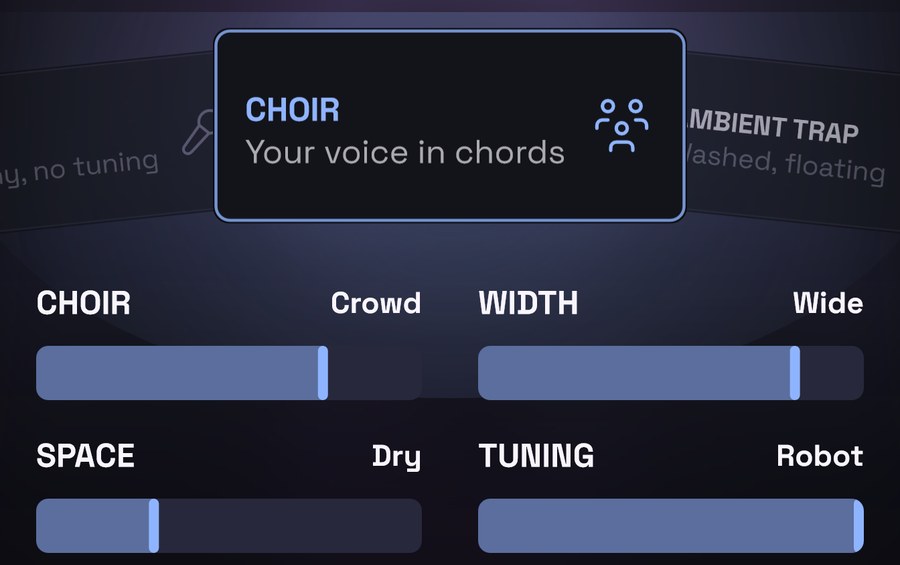
| CHOIR | Choir · Width · Space · Tuning |
| AMBIENT TRAP | Tuning · Space · Echo · Motion |
| ROBOT | Grit · Echo · Space · Tone |
| LOCO | Motion · Grit · Echo · Space |
| MELODIC TRAP | Tuning · Width · Echo · Octave |
| DEMON | Octave · Grit · Space · Motion |
| R&B | Tuning · Choir · Space · Width |
| LATIN TRAP | Tuning · Echo · Space · Width |
| RADIO | Grit · Echo · Motion · Space |
| DEMBOW | Tuning · Grit · Echo · Tone |
| POP | Tuning · Octave · Space · Tone |
| AFRO | Tuning · Width · Echo · Tone |
| FLAMENCO | Tuning · Choir · Space · Tone |
| DRILL | Grit · Voice · Echo · Tuning |
| TALKBOX | Tuning · Grit · Octave · Motion |
| MELODIC URBAN | Tuning · Tone · Space · Width |
| VAPORWAVE | Grit · Tone · Space · Voice |
| CORRIDOS | Tuning · Echo · Space · Grit |
Here’s how a few of them look:
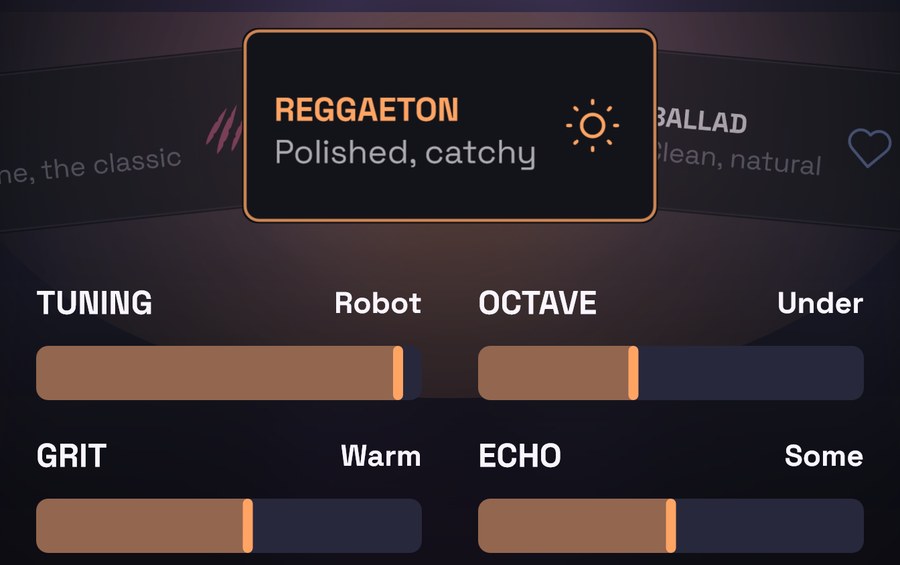
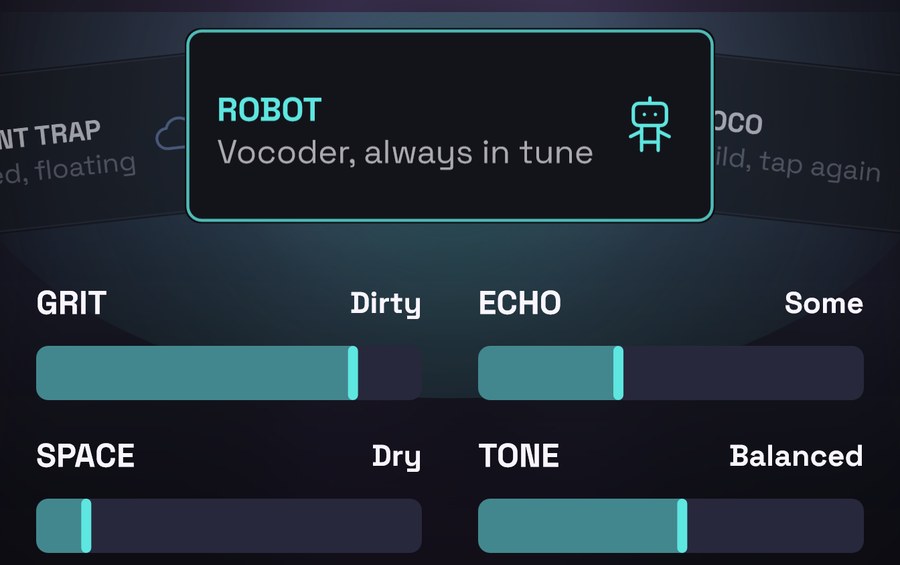
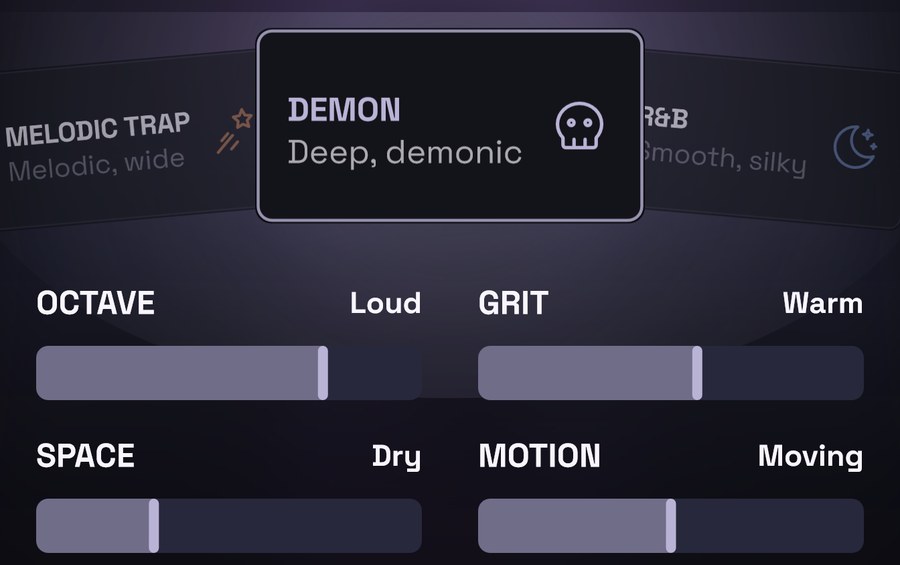
Custom
If you change a take’s sound by hand in Pro mode (you open an effect and move something, add or remove one…), that take no longer sounds like its style. The Custom card (Your own sound) then appears first in the carousel and stays in the centre.
- The controls are still there, the ones from the last style, except those that moved an effect you’ve removed.
- If you move a control, it’s applied on top of your sound as you left it, and the take stays Custom.
- If you choose another style in the carousel, the take switches to that style and your manual changes are lost (Undo brings them back).
You also see Custom if the take used one of your own styles that you later deleted: it sounds the same, but it no longer has a name.
Your saved styles
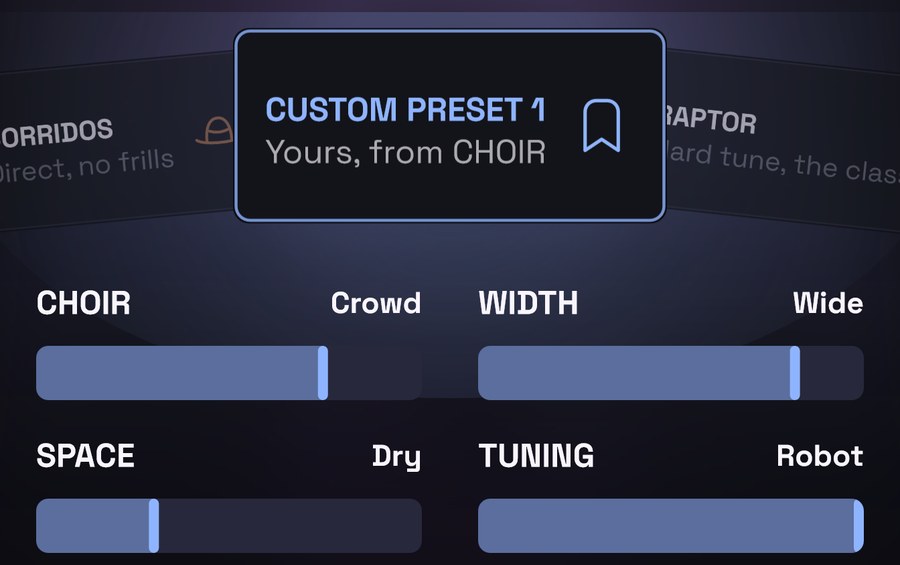
In Pro mode you can save a take’s sound as your own style (Custom presets, Premium). Your styles appear in the carousel after VRaptor’s 22 styles, with the name you gave them and, below it, the style they started from (for example “Yours, from CHOIR”). You choose and adjust them like any other. All about them in Custom presets.
Premium styles: try them free
Styles with a padlock are Premium, but you can use them without paying: choose them, adjust them, record with them and listen to your takes as much as you like.
- While the take you’re on has a Premium style, below the carousel you’ll see: Try it free; exporting it needs Premium.
- The first time you choose one, VRaptor explains it (for example, DRILL is Premium). Tap Got it to carry on or See Premium to see what’s included.
- When you export (video or audio), if any take in the part you export has a Premium style, VRaptor lets you know: This song uses Premium: and the list of what is. You can tap See Premium or Not now. If you don’t want Premium, switch those takes to a style without a padlock and export. A take outside the video’s clip or the audio’s part doesn’t count.
- What counts is the style each take started from: a take that started on a Premium style still counts as Premium even if you change it by hand (Custom).
- Your saved styles count as the style they started from: saved from a Premium one, it carries its padlock when you don’t have Premium (you try it for free, exporting it is Premium); started from a free one, it’s free.
Making songs is free, all of it. Premium is for going further: it’s covered in Export.